


With this article we're starting something we've wanted to do for a while: a series of deep dives into the tools on Jinero — what they do, how they work under the hood, and the honest story of how they came to be, including the approaches that didn't survive.
We're starting with the  Font Recognizer, and not by accident. It's the tool with the longest development story on the site: it went through three completely different engines, we benchmarked each one against the others, and it ended with us training our own neural network. If any tool deserves the first behind-the-scenes post, it's this one.
What it does
You've seen a font you like — on a poster, a screenshot, a photo of a storefront — and you want to know what it is. That's the whole use case.
You upload the image, crop the area with the text, and the Font Recognizer returns the closest matches from our catalog of over 26,000 font families (55,000+ individual styles). Each match comes with a live preview, so you can type your own word and instantly see it rendered in every candidate font — the fastest way to confirm "yes, that's the one".
Three things worth calling out:
- No typing required. You don't have to tell the tool what the text in the image says. It looks at letterforms, not words.
- It reads Cyrillic. Cyrillic support tends to be less visible, less documented, and less consistent across font identification tools. Our model was explicitly trained and benchmarked on both Latin and Cyrillic — a screenshot of Ukrainian text works just as well as English.
- It's free, with no sign-up. Crop, recognize, download the font if it's in our catalog.
How it works (the accessible version)
Modern font recognition isn't about "reading" the text. Our engine converts the cropped image into a compact numeric fingerprint — an embedding, a vector of 128 numbers that describes the shapes of the letters: stroke contrast, terminals, proportions, the overall skeleton of the typeface.
Every font in the catalog already has its own fingerprints, precomputed from clean renders and stored in an index. Recognition is then just a similarity search: compare your image's fingerprint against the index and return the closest families. The heavy lifting happens once, offline; your query takes a fraction of a second.
A few practical details we had to get right:
- Dark-on-light normalization. The index is built from dark text on a light background. If your screenshot is inverted — light text on a dark site — the tool detects that from the crop's border and flips it before matching.
- One result per family. A bold and a regular of the same typeface shouldn't crowd the results as two entries. We aggregate to the family level and show its best-matching style.
- Robustness to real screenshots. A JPEG-compressed, slightly blurry photo looks nothing like a pristine font render. The model was trained specifically to ignore that gap (more on this below).
The story: three engines, two rewrites
Attempt 1: the handcrafted engine
The first version worked the way a typographer might, if a typographer were a script: it used OCR to read the text in your image, upscaled the crop with a super-resolution model (ESPCN), then rendered that same text in every candidate font and compared the images using handcrafted geometric features — projection profiles, stroke measurements — with a re-ranking pass on top.
It worked. Sort of. Two problems killed it:
- Speed. Rendering and comparing text across thousands of fonts took around 55 seconds per query. Acceptable for a demo, painful for a real tool.
- A brittle "all or nothing" pattern. Top-1 accuracy was 36% — and top-3 accuracy was also 36%. If the right font wasn't the very first result, it wasn't in the list at all. There was no useful "close matches" shortlist, which is half the value of a tool like this.
It also depended on OCR being right. Stylized lettering — exactly the kind people most want to identify — is exactly what OCR is worst at.
Attempt 2: an off-the-shelf neural network
Next we tried a ready-made font classification CNN (an EfficientNet-B3 trained by a third party on 3,473 font classes). It beat our handcrafted engine — 48% top-1, 60% top-3 — and it was fast.
But a fixed classifier has a hard ceiling: it can only ever name the fonts it was trained on. Our catalog was bigger than its class list, kept growing weekly, and included Cyrillic families the model had never seen. Every new batch of fonts would have meant retraining. That's not an engine, that's a treadmill.
Attempt 3: our own trained embedding model
So we trained our own — a compact EfficientNet-B0 that maps any text image to that 128-number fingerprint, trained with metric learning on renders of our own catalog, Latin and Cyrillic together.
The key trick was in the training data. We didn't train it on clean font renders alone — we aggressively degraded them: blur, noise, JPEG compression artifacts, tinted backgrounds, slight rotation. The model learned that a crisp catalog render and a mediocre phone photo of the same typeface should land on the same fingerprint. That property — render invariance — is what makes it work on real screenshots.
The architecture also solved the treadmill problem. When new fonts arrive, we don't retrain anything — we just render them, compute their fingerprints with the existing model, and add them to the index. The catalog grows; the model stays put.
And it solved the speed problem for good. Because all the heavy work — rendering and fingerprinting the catalog — happens offline, a live query is just one small-model inference plus a similarity search. On our production hardware the full engine pass takes about 200 ms (median ~195 ms over repeated runs, CPU only — no GPU involved). The v1 engine needed ~55 seconds for the same job: roughly 280× faster, while nearly doubling top-3 accuracy.
The same recognizer is also available through our public  Fonts API (
POST /api/v1/fonts/recognize) for developers who want font identification inside their own workflows.
The results
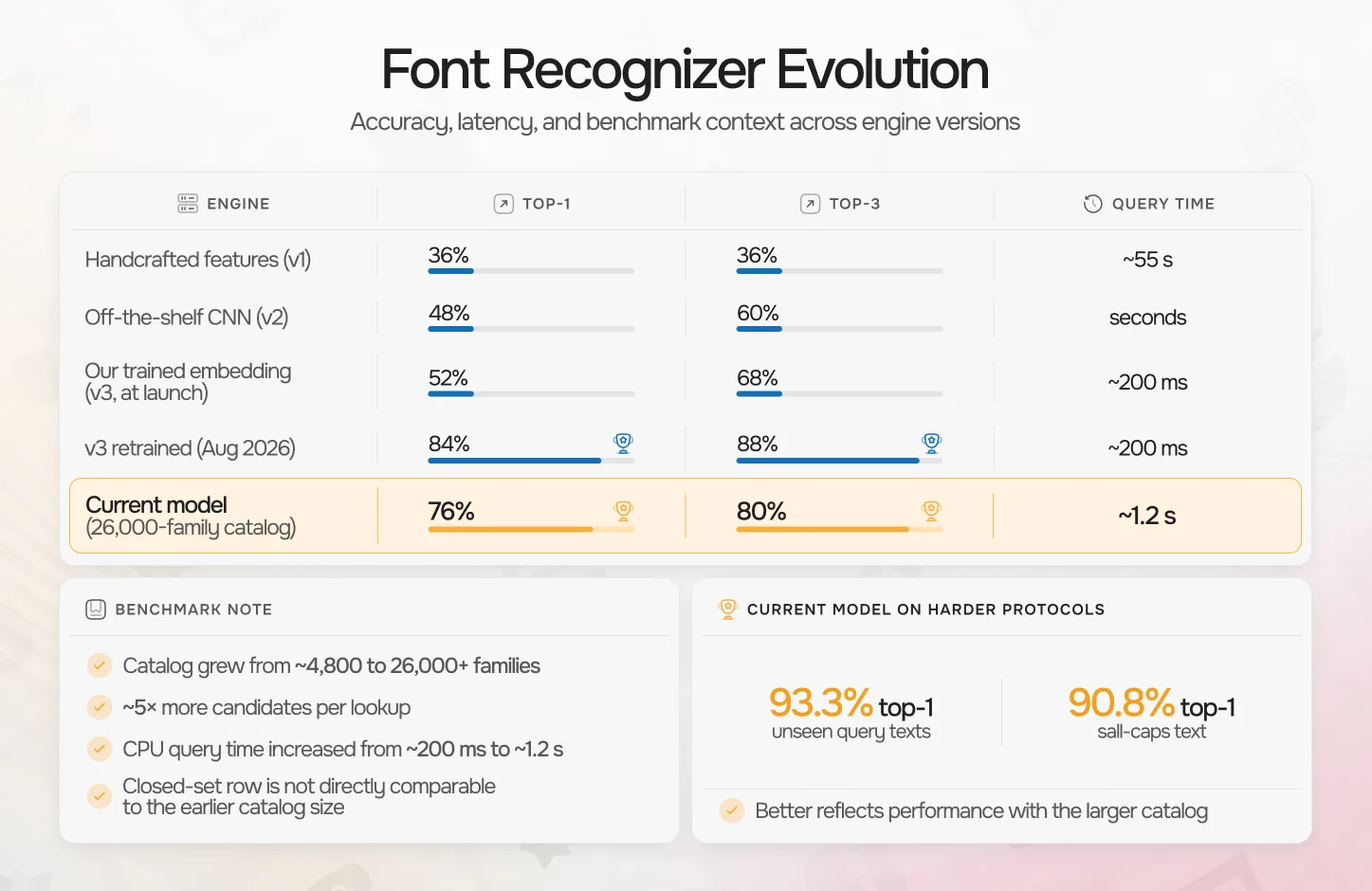
We benchmarked all three engines on an identical protocol: the same set of fonts, the same degraded screenshot-like inputs, family-level accuracy.
| Engine | Top-1 | Top-3 | Query time |
|---|---|---|---|
| Handcrafted features (v1) | 36% | 36% | ~55 s |
| Off-the-shelf CNN (v2) | 48% | 60% | seconds |
| Our trained embedding (v3, at launch) | 52% | 68% | ~200 ms |
| v3 retrained (Aug 2026) | 84% | 88% | ~200 ms |
| Current model (26,000-family catalog) | 76% | 80% | ~1.2 s |
Two things changed in that last row, and both were deliberate. The catalog grew from roughly 4,800 font families to over 26,000 — more than five times bigger — and we retrained from scratch on all of it with a larger network at a higher input resolution. Every lookup now runs against five times more candidates, and query time went from ~200 ms to about 1.2 seconds: the price of a heavier model on a CPU.
The accuracy column in that row is easy to misread as a step backwards, so it deserves a caveat. This benchmark is a closed set of 25 fonts, where a single font is worth four percentage points — and that shared set is itself drawn from a catalog that is now five times larger, so the last two rows are not measuring the same task. On the protocols that can actually tell the two models apart — unseen query texts, the whole catalog acting as distractors — the newer one is far ahead: 93.3% top-1 against 72.4%, and 90.8% against 61.3% on all-caps text. Those numbers are in the epilogue below.
What exactly did we benchmark?
A fair question — accuracy numbers mean nothing without the protocol. The test set is 25 font families present in all three engines' coverage (a constraint set by the off-the-shelf classifier, which only knows its fixed class list). For each family we rendered a text sample and ran it through a screenshot-degradation pipeline: 3× downscale-and-upscale (simulating small on-screen text), mild blur, JPEG compression at quality 45, and sensor noise — then fed the identical degraded images to all three engines with a fixed random seed. Accuracy is family-level: a prediction counts as correct if it names the right font family, any style; top-3 counts the right family anywhere in the first three results.
Note that these numbers come from deliberately degraded inputs — the benchmark simulates bad screenshots, because that's real life. The retrained model barely notices the degradation at all: on our hardest internal protocol (unseen query texts against the full 15,000-font catalog) its top-1 accuracy is identical on clean and degraded inputs.
And the top-3 number matters more than it looks: in practice you glance at three candidates with your own preview text and pick the right one instantly. The v1 engine couldn't offer that at all — the current model gets you there nearly nine times out of ten, on ugly inputs.
One bonus we didn't plan: the same fingerprints now power the "Similar fonts" section on every font page in the catalog. Train one model, get two features.
How it compares to other font finders
Font identification is not a new idea, and some established tools do it well. If you're hunting a font, here's an honest map of the landscape:
- WhatTheFont (MyFonts) — probably the best-known one, backed by a huge commercial library. Great Latin coverage; results naturally steer toward fonts you can buy on MyFonts.
- WhatFontIs — a huge index mixing free and commercial fonts, with strong alternative-font discovery. A free tier is available, while unlimited searches, custom previews, and advanced filters are part of PRO.
- Fontspring Matcherator — clean, fast, no sign-up, with OpenType-feature tag filtering. Focused on the Fontspring/commercial catalog.
- Font Squirrel Matcherator — same engine family as Fontspring's, oriented toward Font Squirrel's free-for-commercial-use library.
- Identifont — the veteran of the genre: no image upload, just a questionnaire about letter shapes ("does the Q have a straight tail?"). Slower, but surprisingly effective when all you have is a memory of the font.
Where does ours fit? Three things set it apart in this company:
- Cyrillic as a first-class citizen — trained on it, indexed with it, benchmarked on it. For Ukrainian text, this is the difference between "works" and "guesses".
- Instant preview with your text — every candidate re-renders live with whatever word you type, which turns "top 3 candidates" into "the answer" in seconds.
- Free, no account, and downloadable — matches link straight to font pages in our catalog, where the fonts themselves are free to download and use.
We won't pretend to out-cover MyFonts' commercial library — if you're identifying a licensed corporate typeface, WhatTheFont may name the exact retail font while we show you its closest relatives. Different catalogs, different strengths. For free fonts, and for anything Cyrillic, we'd put our recognizer up against any of them.
Epilogue: then we made the catalog 7× bigger — and retrained again
This post was almost finished when we did something that changed the numbers once more. In a single week we expanded the catalog from ~5,000 to over 26,000 published families (34,500 in total), and retrained the model from scratch on the full collection — a bigger backbone (EfficientNet-B2), higher resolution (288 px), full glyph coverage including extended Latin and Cyrillic, uppercase-heavy sampling, and variable-font axis sampling driven by the fonts' real fvar tables.
On a 900-family evaluation protocol, the new model identifies the right family 93.3% of the time (98.7% top-3) where the previous one managed 72.4% — and on all-caps poster text, the hardest real-world case, it jumped from 61.3% to 90.8% top-1. The recognizer you're using today runs this model, backed by a 278,000-render index and an OCR-assisted rerank stage that separates near-identical typefaces on your exact text.
From a 55-second handcrafted script that was right a third of the time, to a self-trained neural network that recognizes among 26,000 families in about a second — that's the whole story so far. It won't be the last chapter.
What's next
The recognizer isn't frozen. Two things keep improving it, on two different schedules:
- The catalog grows every week — and thanks to the embedding architecture, every new font family becomes recognizable the moment it's fingerprinted and added to the index. No retraining, no waiting for the next model version.
- The model itself gets periodic upgrades. As the catalog expands, so does our training data — every new family is more material for the next training run. On the roadmap: higher-resolution training for finer discrimination on decorative and script faces, broader script coverage beyond Latin and Cyrillic (Greek and Vietnamese first), and multi-crop queries — recognizing from two or three samples of the same font at once and averaging the fingerprints for a more stable match.
Accuracy numbers in this post are a snapshot, not a ceiling.
Try it
The Font Recognizer is live at jinero.online/fonts/recognizer — free, no sign-up, Latin and Cyrillic. Take a screenshot of a font you've been curious about and see what comes back.
This is the first post in our tool deep-dive series. Next up, we'll pick another tool from the collection and take it apart the same way. If there's one you'd like us to cover first — tell us.
Comments 0
Sign in to be the first to comment.